 Kaartje say: car‑tyuh
Press a key, get a Trello card with the page, mail or file you're looking at already in it.
You picked the boring version: same content as the board, in one plain column. Kaartje is a small Mac menu bar app I built for myself. Here's me using it for two minutes:
Recorded on my own Mac, no cuts. Sound on, I talk you through it.

Hi, I'm Sulejman. I use Trello for everything, and getting stuff into it was always the annoying part: switch to Trello, find the board, new card, paste the link, switch back. Trello's own desktop app has a quick add window, but it only takes a title and you still type everything yourself. So I built the version I wanted. The name is Dutch for "little card".
What it does
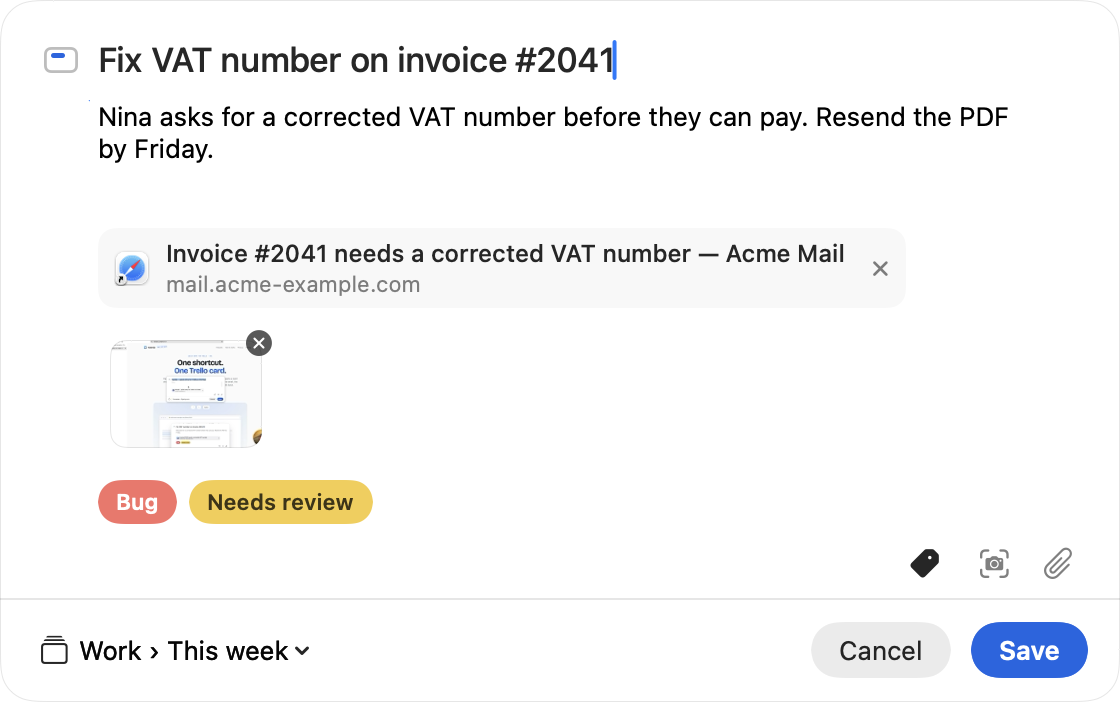
You press a shortcut in any app (⌃⌥Space by default, change it if you like) and a card comes up that's already filled in:
- In Safari, Chrome, Arc, Brave, Helium and other Chromium browsers: the tab title and the URL.
- In Mail: the subject, the sender, and a link that reopens the message.
- In Finder: the files you selected, attached to the card.
- In any app: the text you selected becomes the title, or the notes if it's long.
Then you pick a board, a list and labels (it remembers the labels you used last time on each board), take a screenshot with ⌘⇧S if you want one, press return, and you're back where you were.
What it doesn't do
No due dates, no checklists, no members, no Windows, no iPhone. It's for getting things onto a board fast, not for managing the board. Firefox doesn't tell other apps which tab is open, so there you only get the selected text.
The boring facts
Built in Swift, not Electron. About 4 MB. Needs macOS 14 or later. No account, no server, no analytics: it talks to Trello's API and nothing else, and your Trello token lives in the macOS Keychain. macOS will ask for Automation (to read the current tab or message), Accessibility (only for selected text) and Screen Recording (only for screenshots). Each one is optional. The long version is on the privacy page.
Price
It'll be €9.99, once, for all the Macs you use, updates included. There's a 14-day trial and a 30-day refund if you don't like it, by email, no questions.
It's not for sale yet. I'm finishing notarization and licences. The first 50 people who email me get it free, for good, in exchange for honest feedback, especially about which apps the autofill should support that it doesn't yet.
Email me for a free licenceor write to [email protected]. I read everything.
Questions people asked
- Do I need the Trello desktop app?
- No. Kaartje talks to Trello directly. You sign in with your Trello account once.
- Which browsers work?
- Safari and anything Chromium-based: Chrome, Arc, Brave, Edge, Vivaldi, Opera, Helium. Not Firefox, see above.
- Where do the link, the screenshot and the labels end up?
- The link goes at the bottom of the card description, so it's clickable in Trello. Screenshots and files become attachments. Labels are your board's existing labels; nothing new is created on your board.
- Can I change the shortcut?
- Yes, in Settings. Anything you like.
- How does it compare to Trello's own Quick Add or the bookmarklet?
- I wrote up all six ways to add a card from a Mac, with what each one fills in for you.
- When can I get it?
- Soon. Email me and you'll hear first.